Regular expressions (regex for short) are closely related to FSAs, as we shall see.
Much of the terminology that is needed was already covered in the previous section: we'll be using alphabets to put together a string of letters, and the set of all strings that can be accepted by a particular FSA is called its language.
We'll need the concept of the empty string ( or ), and eventually finite state automata.
So the previous section on FSAs needs to be covered before embarking on regular expressions.
It may be that students have used regular expressions already, because they are built into many programming languages and are often used when writing script programs.
We'll be looking briefly at such applications – and they’re very relevant – but in formal languages we're also interested in the limits of what can be represented, and how to convert a regex to an FSA.
So there should be something here to get students thinking, even if they’re expert at programming with "regexes".
Reverse Pictionary activity
Teacher Note
If you have time, the following activity ("Reverse Pictionary") could be done either before or after teaching regular expressions.
We recommend using it before, as it becomes a constructivist approach that encourages students to design their own notations for regular languages, and is a motivator for learning a precise notation.
A useful activity to develop students' familiarity with FSAs and Regular expressions is a "Reverse Pictionary" game for finite state automata, developed by Linda Pettigrew.
It uses the handout below (or you can make up your own simple FSAs).
Split the class into two groups, A and B.
Hand out one copy of FSM-A to each pair of students in group A, and FSM-B to pairs in group B.
Each pair also requires a language sheet.
They will only be writing in the top half of the sheet.
Students now need to describe all the acceptable inputs for the given FSA (using whatever notation they can come up with, or regular expressions if they have already encountered them).
When they are happy with their description (or five minutes is up) they write it out on the language sheet.
Some suitable descriptions are as follows.
We've used standard regex notation, but students might make up something different.
FSM-A: bee*p(-bee*p)*  or  be*ep(-be*ep)*  or  be+p(-be+p)*
FSM-B: cl(i|a)ck(-cl(i|a)ck)*
FSM-A: mee*o*w  or  me*eo*w  or  me+ow
FSM-B: squ((el)|(ir))ch(-squ((el)|(ir))ch)*
The language sheets from both groups are then collected in.
Sheets from group A are distributed to group B, and vice versa.
The pairs now read the "language" description and fill in the bottom half of the language sheet with four strings that the FSM will accept and four that it will not accept.
Here the students are acting as "programmers", trying to get the computer on the other side to perform a certain task.
The language sheets are then collected in again, and those from group A are distributed to group B and group B’s to group A.
There is no need for pairs to get their original sheet back.
The pairs are now "computers" and need to check that the input provided at the bottom of the language sheet conforms to the FSA.
If one of the strings is accepted or rejected incorrectly, groups will need to work out where the error came from.
Follow-up discussion can review whether some descriptions were longer than they needed to be or confusing to understand, and whether the language of the machines were captured properly.
We've already had a taste of regular expressions in the getting started section.
They are just a simple way to search for things in the input, or to specify what kind of input will be accepted as legitimate.
For example, many web scripting programs use them to check input for patterns like dates, email addresses and URLs.
They've become so popular that they're now built into most programming languages.
You might already have a suspicion that regular expressions are related to finite state automata.
And you'd be right, because it turns out that every regular expression has a finite state automaton that can check for matches, and every finite state automaton can be converted to a regular expression that shows exactly what it does (and doesn’t) match.
Regular expressions are usually easier for humans to read.
For machines, a computer program can convert any regular expression to an FSA, and then the computer can follow very simple rules to check the input.
The simplest kind of matching is just entering some text to match.
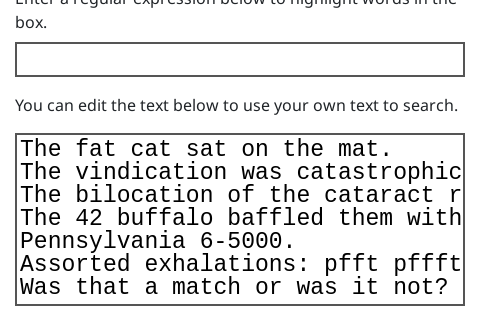
Open the interactive below and type "cat" into the box:
Alternative websites for practicing regular expressions
Teacher Note
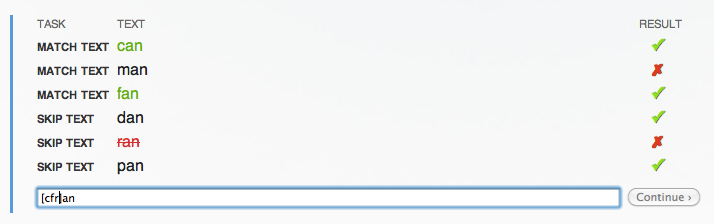
Students can also work through the examples in this section using either Rubular or Regex101.
Alternatively you may prefer to get them to use the excellent tutorial at RegexOne.
RegexOne provides challenges and tests answers in the same window.
Students can get away with inefficient answers, but it's a good environment for playing with the idea.
If you've only typed the 3 characters "cat", then it should find 6 matches.
Now try typing a dot (full stop or period) as the fourth character: "cat.".
In a regular expression, "." can match any single character.
Try adding more dots before and after "cat".
How about "cat.s" or "cat..n"?
What do you get if you search for " ... " (three dots with a space before and after)?
Now try searching for "ic.".
The "." matches any letter, so if you really wanted a full stop, you need to write it like this "ic\." – use this search to find "ic" at the end of a sentence.
Another special symbol is "\d", which matches any digit.
Try matching 2, 3 or 4 digits in a row (for example, two digits in a row is "\d\d").
To choose from a small set of characters, try "[up]ff".
Either of the characters in the square brackets will match.
Try writing a regular expression that will match "fat", "sat" and "mat", but not "cat".
Solution
Teacher Note
A suitable expression is [fsm]at
A shortcut for "[mnopqrs]" is "[m-s]"; try "[f-s]at" and "[4-6]".
Another useful shortcut is being able to match repeated letters.
There are four common rules:
a* matches 0 or more repetitions of a
a+ matches 1 or more repetitions of a
a? matches 0 or 1 occurrences of a (that is, a is optional)
a{5} matches "aaaaa" (that is, a repeated 5 times)
Try experimenting with these.
Here are some examples to try:
f+
pf*t
af*
f*t
f{5}
.{5}n
If you want to choose between options, the vertical bar is useful.
Try the following, and work out what they match.
You can type extra text into the test string area if you want to experiment:
Notice the use of brackets to group parts of the regular expression.
It's useful if you want the "+" or "*" to apply to more than one character.
Regular expression
Jargon Buster
The term regular expression is sometimes abbreviated to "regex", "regexp", or "RE".
It's "regular" because it can be used to define sets of strings from a very simple class of languages called "regular languages", and it's an "expression" because it is a combination of symbols that follow some rules.
Click here for another challenge: you should try to write a short regular expression to match the first two words, but not the last three:
The following regular expression will find common New Zealand number plates in the sample text, but can you find a shorter version using the {n} notation?
[A-Z][A-Z][A-Z]\d\d\d
Solution
Teacher Note
"[A-Z]{3}\d{3}"
How about an expression to find the dates in the text?
Here's one option, but it's not perfect:
\d [A-Z][a-z][a-z] \d\d\d\d
Can you improve on it?
Note
Teacher Note
The expression "\d\d? (Jan|Feb|Mar|Apr|May|Jun|Jul|Aug|Sep|Oct|Nov|Dec) \d\d\d\d" is more accurate, but a more sophisticated version would be used in practice to take account of various formats.
What about phone numbers?
You'll need to think about what variations of phone numbers are common!
How about finding email addresses?
Solutions
Teacher Note
Here are two fairly simple solutions for email addresses, but more refined ones are possible:
\w+@\w+\.\w+ only finds email address with two parts to the domain
The particular form of regular expression that we've been using is for the Ruby programming language (a popular language for web site development), although it's very similar to regular expressions used in other languages including Java, JavaScript, PHP, Python, and Microsoft's .NET Framework.
Even some spreadsheets have regular expression matching facilities.
But regular expressions have their limits – for example, you won't be able to create one that can match palindromes (words and phrases that are the same backwards as forwards, such as "kayak", "rotator" and "hannah"), and you can't use one to detect strings that consist of n repeats of the letter "a" followed by n repeats of the letter "b".
For those sort of patterns you need a more powerful system called a grammar (see the section on Grammars).
But nevertheless, regular expressions are very useful for a lot of common pattern matching requirements.
There's a direct relationship between regular expressions and FSAs.
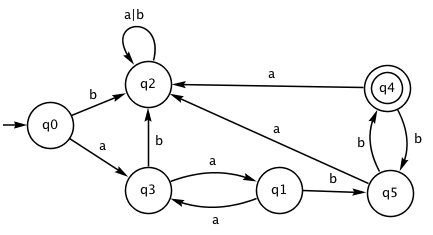
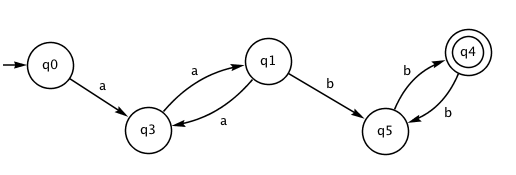
For example, consider the following regex, which matches strings that begin with an even number of the letter "a" and end with an even number of the letter "b":
(aa)+(bb)+
Now look at how the following FSA works on these strings – you could try "aabb", "aaaabb", "aaaaaabbbb", and also see what happens for strings like "aaabb", "aa", "aabbb", and so on.
You may have noticed that q2 is a "trap state".
We can achieve the same effect with the following FSA, where all the transitions to the trap state have been removed – the FSA can reject the input as soon as a non-existent transition is needed.
Like an FSA, each regular expression represents a language, which is just the set of all strings that match the regular expression.
In the example above, the shortest string in the language is "aabb", then there's "aaaabb" and "aabbbb", and of course an infinite number more.
There's also an infinite number of strings that aren't in this language, like "a", "aaa", "aaaaaa" and so on.
In the above example, the FSA is a really easy way to check for the regular expression – you can write a very fast and small program to implement it (in fact, it's a good exercise: you typically have an array or list with an entry for each state, and each entry tells you which state to go to next on each character, plus whether or not it's a final state.
At each step the program just looks up which state to go to next.)
Fortunately, every regular expression can be converted to an FSA.
We won't look at the process here, but both Exorciser and JFLAP can do it for you anyway (see the activities below).
Converting a regex to an FSA is also built into most programming languages.
Programmers usually use regular expressions by calling functions or methods, into which the regex and the string to be searched are passed.
Behind the scenes, the regular expression is converted to a finite state automaton, and then the job of checking your regular expression is very easy.
Designing regular expressions
Project
Here are some ideas for regular expressions for you to try to create.
You can check them using the Regular Expression Searcher as we did earlier, but you'll need to make up your own text to check your regular expression.
When testing your expressions, make sure that they not only accept correct strings, but reject ones that don't match, even if there's just one character missing.
You may find it easier to have one test match string per line in the test area.
You can force your regular expression to match a whole line by putting "^" (start of line) before the regular expression, and "$" (end of line) after it.
For example, "^a+$" only matches lines that have nothing but "a"s on them.
Here are some challenges to try to create regular expressions for:
local forms of non-personalised number plates (e.g. AB1234 or ABC123 in New Zealand)
any extended form of the word "hello", e.g. "helloooooooooooo"
variants of "aaaarrrrrgggggghhhh"
a 24-hour clock time (e.g. 23:00) or a 12-hour time (e.g. 11:55 pm)
a bank account or credit card number
a credit card expiry date (must have 4 digits e.g 01/15)
a password that must contain at least 2 digits (don't test it against your own!)
a date
a phone number (choose your format e.g. mobile only, national numbers, or international)
a dollar amount typed into a banking website, which should accept various formats like "$21.43", "$21", "21.43", and "$5,000", but not "21$", "21.5", "5,0000.00", and "300$".
acceptable identifiers in your programming language (usually something like a letter followed by a combination of letters, digits and some punctuation symbols)
an integer in your programming language (allow for + and - at the front, and some languages allow suffixes like L, or prefixes like 0x)
an IP address (e.g. 172.16.5.2 or 172.168.10.10:8080)
a MAC address for a device (e.g. e1:ce:8f:2a:0a:ba)
postal codes for several countries e.g. NZ: 8041, Canada: T2N 1N4, US: 90210
a (limited) http URL, such as "http://abc.xyz", "http://abc.xyz#conclusion", "http://abc.xyz?search=fgh".
Converting regular expressions to FSAs
Project
For this project you will make up a regular expression, convert it to an FSA, and demonstrate how some strings are processed.
There's one trick you'll need to know: the software we're using doesn't have all the notations we've been using above, which are common in programming languages, but not used so much in pure formal language theory.
In fact, the only ones available are:
a* matches 0 or more repetitions of a
a|b matches a or b
(aa|bb)* Parentheses group commands together; in this case it gives a mixture of pairs of "a"s and pairs of "b"s.
Having only these three notations isn't too much of a problem, as you can get all the other notations using them.
For example, "a+" is the same as "aa*", and "\d" is "0|1|2|3|4|5|6|7|8|9".
It's a bit more tedious, but we'll mainly use exercises that only use a few characters.
Converting with Exorciser
Use this section if you're using Exorciser; we recommend Exorciser for this project, but if you're using JFLAP then skip to Converting with JFLAP below.
Exorciser is very simple.
In fact, unless you change the default settings, it can only convert regular expressions using two characters: "a" and "b".
But even that's enough (in fact, in theory any input can be represented with two characters – that's what binary numbers are about!)
On the plus side, Exorciser has the empty string symbol available – if you type "e" it will be converted to .
So, for example, "(a| " acts as "a?" (an optional "a" in the input).
To do this project using Exorciser, go to the start ("home") window, and select the second link, "Regular Expression to Finite Automata Conversion".
Now type your regular expression into the text entry box that starts with "R =".
As a warmup, try:
aabb
then click on "solve exercise" (this is a shortcut – the software is intended for students to create their own FSA, but that's beyond what we're doing in this chapter).
You should get a very simple FSA!
To test your FSA, right-click on the background and choose "Track input".
Now try some more complex regular expressions, such as the following.
For each one, type it in, click on "solve exercise", and then track some sample inputs to see how it accepts and rejects different strings.
aa*b
a(bb)*
(bba*)*
(b*a)*a
Your project report should show the regular expressions, explain what kind of strings they match, show the corresponding FSAs, show the sequence of states that some sample test strings would go through, and you should explain how the components of the FSA correspond the parts of the regular expression using examples.
Converting with JFLAP
If you're using JFLAP for your project, you can have almost any character as input.
The main exceptions are "*", "+" (confusingly, the "+" is used instead of "|" for alternatives), and "!" (which is the empty string – in the preferences you can choose if it is shown as or ).
So the main operators available in JFLAP are:
a* matches 0 or more repetitions of a
a+b matches a or b
(aa+bb)* Parentheses group commands together; in this case it gives a mixture of pairs of "a"s and pairs of "b"s.
The JFLAP software can work with all sorts of formal languages, so you'll need to ignore a lot of the options that it offers! This section will guide you through exactly what to do.
There are some details about the format that JFLAP uses for regular expressions in their tutorial – just read the "Definition" and "Creating a regular expression" sections.
As a warmup, we'll convert this regex to an FSA:
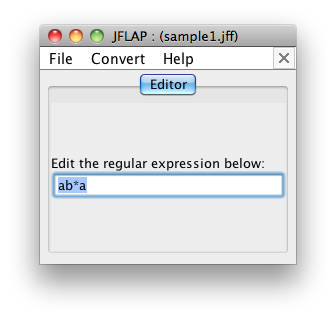
ab*b
On the main control window of JFLAP click on "Regular Expression", and type your regular expression into JFLAP:
From the "Convert" menu choose "Convert to NFA".
This will only start the conversion; press the "Do all" button to complete it (the system is designed to show all the steps of the conversion, but we just want the final result).
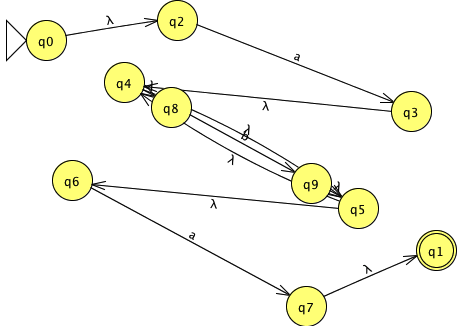
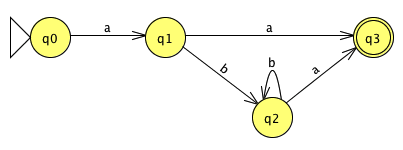
For the example, we get the following non-deterministic finite automaton (NFA), which isn't quite what we want and probably looks rather messy:
We need a DFA (deterministic FA), not an NFA.
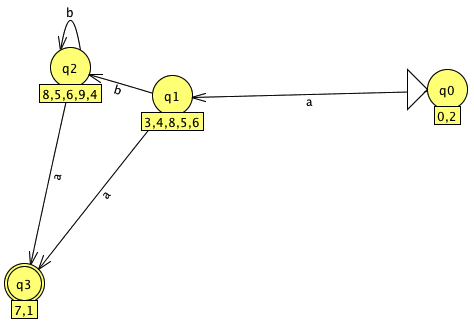
To convert the NFA to a DFA, press the "Export" button, then from the "Convert" menu, choose "Convert to DFA", press the "Complete" button to complete the conversion, and then the "Done?" button, which will put it in a new window:
We're nearly there.
If it's hard to read the FSA, you can move states around with the arrow tool (on the left of the tool bar).
The states may have some extraneous labels underneath them; you can hide those by selecting the arrow tool, right-click on the white part of the window and un-check "Display State Labels".
If the FSA is simple enough, it may be just as easy if you now copy the diagram by hand and try to set it out tidily yourself, otherwise you can save it as an image to put into your project.
Now try some sample inputs.
The starting state is labeled q0 and will have a large arrow pointing at it.
You can get JFLAP to run through some input for you by using the "Input" menu.
"Step by state" will follow your input state by state, "Fast run" will show the sequence of states visited for your input, and "Multiple run" allows you to load a list of strings to test.
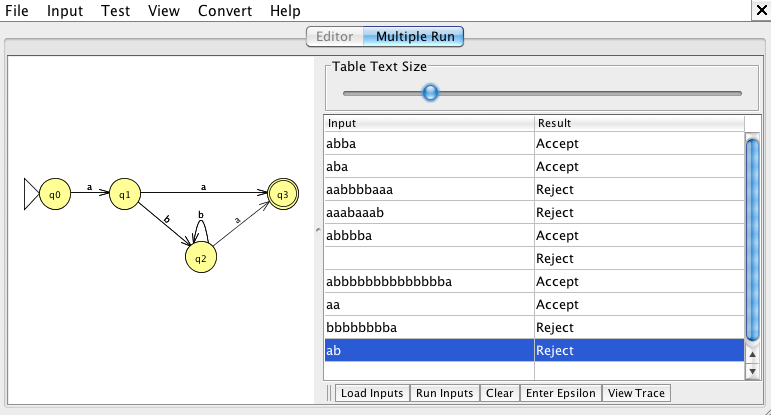
Multiple runs are good for showing lots of tests on your regular expression:
For example, "ab" is rejected because it would only get to state 2.
Now you should come up with your own regular expressions that test out interesting patterns, and generate FSA's for them.
In JFLAP you can create FSAs for some of regular expressions we used earlier, such as (simple) dates, email addresses or URLs.
Your project report should show the regular expressions, explain what kind of strings they match, show the corresponding FSAs, show the sequence of states that some sample test strings would go through, and you should explain how the components of the FSA correspond to the parts of the regular expression using examples.
Other ideas for projects and activities
Project
Here are some more ideas that you could use to investigate regular expressions:
On the regexdict site, read the instructions on the kinds of pattern matching it can do, and write regular expressions for finding words such as:
words that contain "aa"
all words with 3 letters
all words with 8 letters
all words with more than 8 letters
words that include the letters of your name
words that are made up only of the letters in your name
words that contain all the vowels in reverse order
words that you can make using only the notes on a piano (i.e the letters A to G and a to g)
words that are exceptions to the rule "i before e except after c" – make sure you find words like "forfeit" as well as "science".
Explore regular expressions in spreadsheets.
The Google docs spreadsheet has a function called RegExMatch, RegExExtract and RegExReplace.
In Excel they are available via Visual Basic.
The "grep" command is available in many command line systems, and matches a regular expression in the command with lines in an input file (the name comes from "Global Regular Expression Parser").
Demonstrate the grep command for various regular expressions.
Functions for matching against regular expressions appear in most programming languages.
If your favourite language has this feature, you could demonstrate how it works using sample regular expressions and strings.
Advanced: The free tools lex and flex are able to take specifications for regular expressions and create programs that parse input according to the rules.
They are commonly used as a front end to a compiler, and the input is a program that is being compiled.
You could investigate these tools and demonstrate a simple implementation.
More information on regular expression
Teacher Note