Computers are incredibly fast at manipulating, moving and looking through data.
However, the amount of data computers use is often so large that it doesn't matter how fast the computer is, it can take it far too long to examine every single piece of data (companies like Google, Facebook and Twitter routinely process billions of things per day, and in some cases, per minute!).
This is where algorithms come in.
If a computer is given a good algorithm to process the data then it doesn't matter how much information it has to look through, it will still be able to do it in a reasonable amount of time.
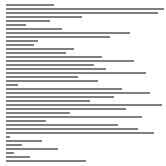
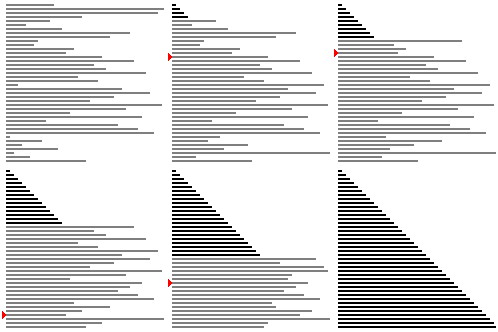
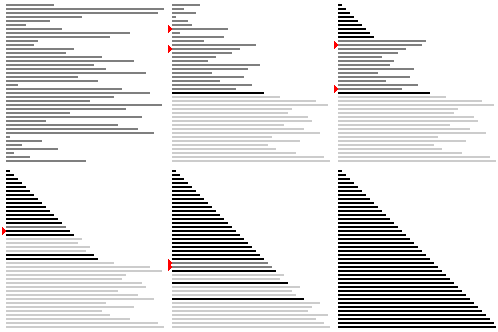
One surprising thing about computing is that two different algorithms that achieve the same result can take very different amounts of time, such as the sorting algorithms below.
These animations use two different algorithms to achieve the same result.
Which one is fastest?
If you have read through the Introduction chapter you may remember that the speed of an application on a computer makes a big difference to a human using it.
If an application you create is too slow, people will get frustrated with it and won't use it.
It doesn't matter if your software is amazing, if it takes too long they will simply give up and try something else!
So, good algorithms are about looking after users as well as avoiding wasting resources.
At this stage you might be thinking that algorithms and computer programs kind of sound like the same thing, but they are actually two very distinct concepts.
They are each different ways of describing how to do something, but at different levels of precision.
To set up the background for talking about algorithms, have a go at this high score challenge:
With the high score challenge, you probably went through each score keeping track of the largest so far.
Let's look at how to describe this algorithm, that is, as a step by step process that describes how to solve a problem and/or complete a task, which will always give the correct result.
Algorithms are often expressed using a loosely defined format called pseudo-code, which matches a programming language fairly closely, but leaves out details that could easily be added later by a programmer.
Pseudocode doesn't have strict rules about the sorts of commands you can use, but is precise enough to show what to do.
With the high-score problem, a common algorithm for solving it might be written in pseudo-code like this:
note the first score in the table
for each of the other scores in the table,
  if that score is larger than the one noted,
    replace the noted one with the current score
display the currently noted score
An important thing with this level of precision is that we can often make a good estimate of how fast it will be.
For the high score problem above, if the score table gets twice as big, the algorithm will take about twice as long.
If the table could be very big (perhaps we're tracking millions of games and serving up the high score many times each second), that might already be enough to tell us that we need a better algorithm to track high scores regardless of which language it's going to be programmed in; or if the table only ever has 10 scores in it, then we know that the program is only going to do a few dozen operations, and is bound to be really fast even on a slow computer.
The most precise way of giving a set of instructions is in the form of a program, which is a specific implementation of an algorithm, written in a specific programming language, with a very specific result for any particular input.
With the high-score problem, it would be written in a particular language; even in a particular language there are lots of choices about how to write it, but here's one particular way of working out a high score (don't worry too much about the detail of the program if the language isn't familiar; the main point is that you could give it to a computer that runs Python, and it would follow the instructions exactly):
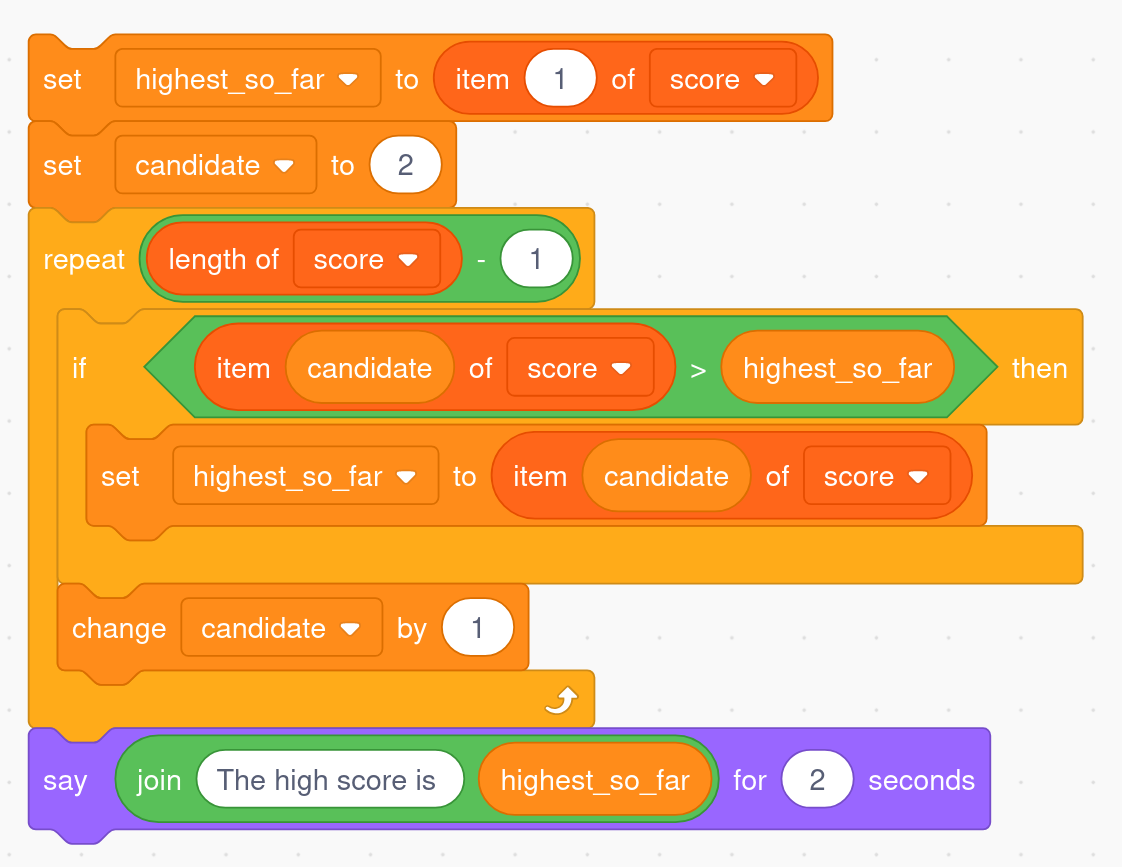
But here's another program that implements exactly the same algorithm, this time in the Scratch language.
Both of the above programs are the same algorithm.
In this chapter we'll look in more detail about what an algorithm is, and why they are such a fundamental idea in computer science.
Because algorithms exist even if they aren't turned into programs, we won't need to look at programs at all for this topic, although running programs does give you practical experience with algorithms.
When Computer Scientists are comparing algorithms they often talk about the 'cost' or 'complexity' of an algorithm.
The cost of an algorithm can be interpreted in several different ways, but it is always related to how well an algorithm performs based on the size of its input.
In this chapter we will talk about the cost of an algorithm as either the time it takes a program (which performs the algorithm) to complete, or the number of steps that the algorithm makes before it finishes.
For example, one way of expressing the cost of the high score algorithm above would be to observe that for a table of 10 values, it does about 10 sets of operations to find the best score, whereas for a table of 20 scores, it would do about twice as many operations.
In general the number of operations for a list of n items will be proportional to n.
Not all algorithms take double the time for double the input; some take a lot more than double, while others take a lot less.
That's worth knowing in advance because we usually need our programs to scale up well; in the case of the high scores, if you're running a game that suddenly becomes popular, you want to know in advance that the high score algorithm will be fast enough if you get more scores to check.
Algorithm complexity
The formal term for working out the cost of an algorithm is algorithm analysis, and we often refer to the cost as the algorithm's complexity.
The most common complexity is the "time complexity" (a rough idea of how long it takes to run), but often the "space complexity" is of interest - how much memory or disk space will the algorithm use up when it's running?
There's more about how the cost of an algorithm is described in industry, using a widely agreed on convention called 'Big O Notation', in the "The whole story!" section at the end of this chapter, and complexity is defined in more detail in its own chapter!
How precise do we need to be?
You may have noticed that the high-score algorithm actually loops 9 times when given 10 items of data, and it would look 99 times if given 100 items.
In algorithm analysis, we usually don't worry about being this precise, as n is usually very large; no-one minds if something takes 100,000 or 99,999 operations, as the difference is insignificant.
The amount of time a program which performs the algorithm takes to complete may seem like the simplest cost we could look at, but this can be affected by a lot of different things, like the speed of the computer being used, or the programming language the program has been written in.
This means that if the time the program takes to complete is used to measure the cost of an algorithm it is important to use the same program and the same computer (or another computer with the same speed) for testing the algorithm with a different numbers of inputs.
The number of operations (such as comparisons of data items) that an algorithm makes however will not change depending on the speed of a computer, or the programming language the program using the algorithm is written in.
Some algorithms will always make the same number of comparisons for a certain input size, while others might vary.
In computing, “problems” refer to specific well defined tasks that can be solved by a program; the “problems” that you are likely to get encounter initially are:
This is finding a given value in a list or in a disk file, for example, when someone taps a card in Paywave, the system needs to look up their card number and find out their bank details.
In Python a quick and dirty way to do a search of a list is the “in” function; for example
In its simplest form it would sort the values in a list (or array) in memory.
Having sorted output from a computer is common (e.g. emails are often sorted by the date they arrived; files are often sorted by their name, or the date they were last modified).
In Python a fast way to sort a list of values is the “sort” method:
Given a set of places on a map, work out the shortest route to visit all of the places.
For example, this would be used by a courier driver who has to drop off parcels to a list of addresses.
There are thousands of other problems that people have found algorithms for, but the ones above are widely used, and can be used to illustrate the main issues around algorithms.
An important point is that the problems above (like searching and sorting) aren’t algorithms - they are the problems that we need to find algorithms to solve!
These are solutions to problems that can be implemented as a computer program.
Most problems have many possible algorithms to solve them, and it’s important to choose the right algorithm for a given situation.
Some examples of algorithms for the problems above are as follows:
The simplest algorithm for searching is a sequential search, which just checks each value until it finds the one being searched for.
This is usually very slow.
The Python “in” function uses a sequential search to search a list.
A faster searching algorithm is binary search, but it requires the data to be sorted into order first.
The most widely used searching algorithm is called “hashing”, and it is also common to use “search trees”; but we’ll save them for another day.
Once you understand the simpler algorithms, you’re set up well to pick up new ones as you go along.
Simple algorithms for sorting include selection sort, insertion sort, and bubble sort.
These are almost always too slow, and in practice only insertion sort gets used in some special cases.
However, they are great for illustrating ideas around algorithms.
The sorting algorithms most commonly used are based on mergesort and quicksort.
One algorithm to solve the TSP is to try out every possible order of visiting the drop-off points.
It’s called a “brute force” algorithm because it just tries every possible route and picks the best one; this turns out to be impossibly slow (even on a fast computer), but it’s a great way to illustrate how things can go badly wrong!
You can try it out here - see how long it takes to solve the problem for just 21 cities!
In this chapter we will look at algorithms for two of the most common and important types of problems, searching and sorting.
You probably come across these kinds of algorithms every time you use a computer without even realising!
They also happen to be great for illustrating some of the key concepts that arise with algorithms.